
Setting Up Your Mariogasm Hard Drive or SD Card On A Modded Wii Console
Thank You for purchasing a Gaming Hard Drive or card from us. If you are setting your drive up on a Wii Console please follow the following instructions. Your Wii Console must be modded for the drive to function. If your console is not modded please follow our guide to do so.
First, Lets check and make sure your Wii Console is set up properly
You will need the following installed on your Wii
Required
- BootMii Installed along with the Homebrew Channel
- The 4 cIOS revisions installed using D2X cIOS Installer
- Base 38 cIOS
- Base 56 cIOS
- Base 57 cIOS
- Base 58 cIOS
Optional
- Wii Console Home Menu Buttons For USB Loaders and Emulators

If you have not done these steps yet then please follow our Wii Console Modding Guide to mod your Wii.
Once Your Wii Console Is Modded

Next, If you have completed the above steps then go ahead and insert the included Mariogasm Homebrew Wii SD Card into your Wii Console SD card slot.
Note: The SD cards are now optional with the hard drives as some folks have their own card. Our drives will work with any Homebrew setup and your custom card as long as you follow our basic setup instructions.
Then, If you bought an HDD you will need to use the included USB Data Cable that was included with Wii Hard Drive to hook the drive up to your Modded WIi Console.
If you purchased a modded Wii from us then plug the Wii HDD into the bottom USB port on the Wii console. This will be the USB port that the Homebrew on the SD card looks for to load your Wii and GameCube games. If you modded your own console then it’s also likely the bottom USB port that’s active for Homebrew. If it’s not the bottom one that’s active then try the other USB port.

Buttons, You need channel buttons like the Wii Flow Channel buttons you see in the image to access your emulators and games.
To Add channel buttons please follow the instructions below. The good news is that all the files you need to do add the buttons and further customize your modded console are included on your Wii SD Card.
Adding Channel Buttons
Open The Homebrew Channel, you installed HBC when you modded your Wii Console.
Navigate, to the Homebrew app called “Wii Flow Channel Installer” and open it. Give it a moment to load and then select “Install Channel”. Give it a moment to install, and then return to the Homebrew Menu by pressing the Home Button on your Wii Remote.
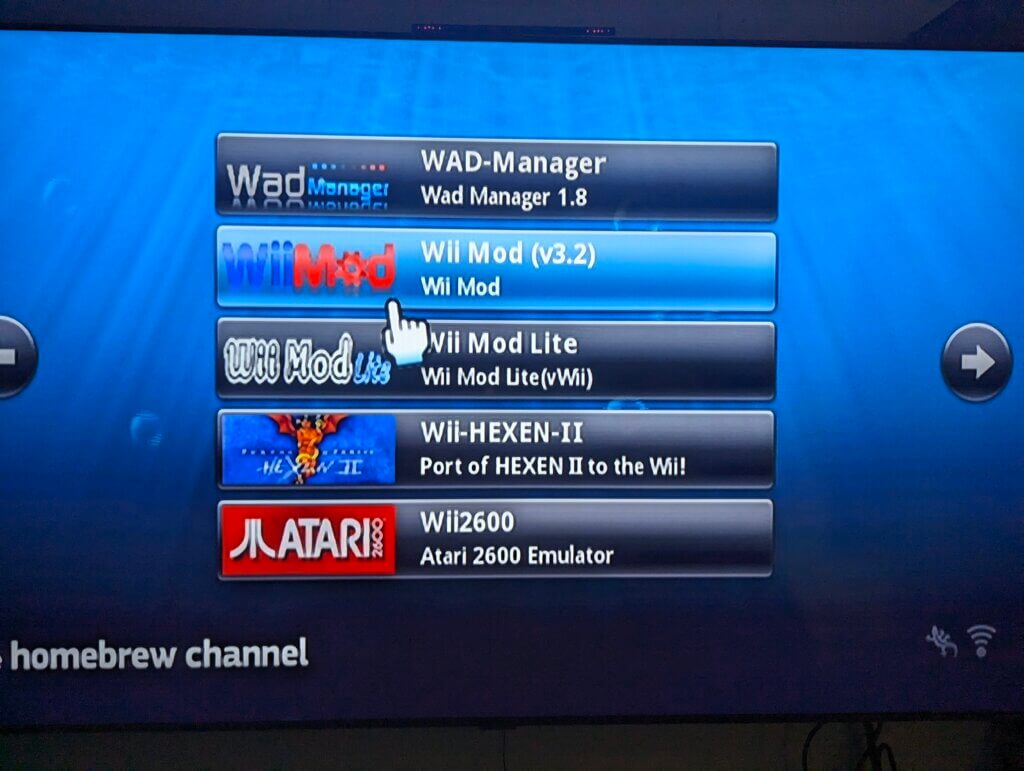
Next, navigate to the Homebrew app called WiiMod (Lite Version Is Fine) using your Wii Remote and open it. Please, Be Careful. Wii Mod is a powerful tool that can highly customize your modded Wii. It can also break things. Please follow the instructions below carefully.
Wii Mod will add a nice skin or cover to your Wii Flow button. It isn’t a required step but it makes the button look a lot nicer and improves your experience with a nice jingle and splash screen as WiiFlow loads. please follow the instructions below carefully.

Using Wii Mod To Install Channel Buttons
First, Open Wii Mod and scroll down to the function called “WAD Manager”. Open the manager and tell it to look on the SD card for files when it asks you. You are looking for files that end in .forwarder toward the bottom. Our standard is to install the 8 Bit forwarder but you can install any one you want. You can go back and change the forwarder or “Button Skin” anytime you want by following this process.
- Select Forwarder or Skin You Want
- Press A To Install The Forwarder
- Press B Twice To Exit
- Press The Wii Remote Home Button To Exit To Homebrew
- Select “Exit To System Menu” To Return To The Wii Console Home Screen
Now check out your shiny new button on your home screen. Click on it and go play some games! That’s it. You are set up and ready to go. Happy Gaming!
In Conclusion
That’s the low down on drive set up. Once again your Wii Console needs to be modded first before doing drive set up so please check out our guide on Modding Your Wii Console if you haven’t done that.
Ask Questions
Ask questions in our user Lounge here: